




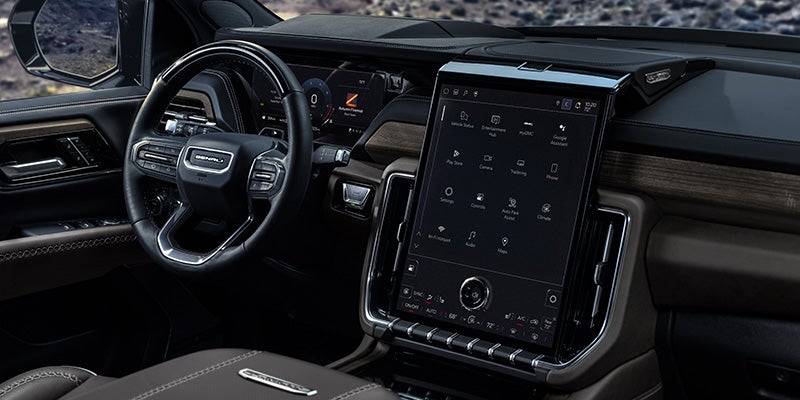
A good infotainment system should disappear into the beat of the drive rather than compete with it. In a modern GMC, the touchscreen, smartphone integration, voice controls, navigation, and connected services are intended to place information within easy reach without turning the dashboard into a collection of distractions. For drivers around Manchester, IA, learning the system before relying on it in traffic is the best way to make the technology feel like part of the vehicle.
Start by Learning the Home Screen
The first few minutes with the GMC infotainment system are best spent stationary, exploring the home screen and the functions available on the specific vehicle. Depending on model and equipment, the system can provide access to audio, phone functions, navigation, vehicle settings, and connected services through the center display. Pairing a compatible smartphone is a logical first step because supported GMC systems offer Apple CarPlay® and Android Auto™ compatibility, with wired or wireless operation depending on configuration. Once connected, drivers can access compatible navigation, audio, messages, and phone functions through the vehicle interface rather than handling the phone itself.
Use Voice and Steering-Wheel Controls Where They Help
Touchscreens are easy to understand when parked, but less appealing when the road demands attention. Steering-wheel controls and available voice recognition provide other ways to manage calls, audio, and supported vehicle functions without repeatedly reaching toward the display. Some GMC models also offer Google built-in compatibility, bringing supported Google services directly into the infotainment system. The exact voice, navigation, and connected features vary by vehicle and trim, so drivers should learn what their GMC includes instead of assuming every model uses the same software or interface.
Customize the System Around the Way You Drive
A well-designed interface becomes easier to live with when frequently used functions are placed where the driver expects them. Depending on the GMC infotainment system, owners may be able to rearrange shortcuts, adjust display settings, change audio preferences, manage connected devices, and configure certain driver or vehicle settings. Taking a few minutes to make those adjustments while parked can reduce the amount of searching required later. The same applies to notification settings: not every alert deserves equal prominence while driving, and a cleaner interface can make the information that does deserve attention easier to find.
Navigation Works Best When You Choose the Right Tool
Equipped GMC models can provide built-in navigation, while Apple CarPlay® and Android Auto™ give drivers access to compatible smartphone navigation apps. Some systems with Google built-in can also integrate Google Maps directly into the vehicle. None of these approaches is automatically superior in every situation. Built-in navigation can integrate more closely with vehicle functions, while smartphone-based navigation gives drivers access to apps and saved destinations they already know. Try both and use the one that requires the least thought while driving.
Keep Connected Features Current
Certain GMC vehicles support over-the-air software updates, connected services, available Wi-Fi® hotspot capability, and OnStar® features, with availability depending on model, equipment, and active service plans. Keeping system software current can help maintain compatibility and performance as the vehicle ages. Owners should also review which connected services are active, which require subscriptions, and which features are built into the vehicle itself. That distinction matters because a feature shown on a display today may depend on a trial period or service plan tomorrow.
Learn the Technology Before You Need It
The best time to learn a new infotainment feature is not while merging onto the highway. Set up smartphone connections, explore navigation, adjust the display, and try voice commands while the vehicle is parked so the controls feel familiar before they are needed on the road. Bob Stephen Motors can help Manchester-area shoppers compare GMC models, infotainment systems, smartphone compatibility, available connected technology, and current GMC inventory. Schedule a test drive online and spend a few minutes with the system from the driver's seat before deciding which setup fits the way you drive.